

 Figwise Team
Your image is done. You are in the submission system, and it is asking things no guide covers.
Does this thing need a legend? A caption? Why is there a second box asking for Highlights?
Almost every one of these has a written answer. It is just not a general answer. Publishers contradict each other in plain sight — IEEE requires a caption, Dove Press forbids one — so the only binding rule is the one on your own journal's page.
Six questions below. Each answer comes with the page it came from.
Does a graphical abstract need a figure legend or a caption?
Usually no, and at several publishers a legend is banned outright. But IEEE and the SMDM journals require a caption instead, so check yours before you assume.
Here is the split, quoted:
| Publisher or journal | What it says about text outside the image |
|---|---|
| Elsevier | "No additional text, outline, or synopsis should be included. Any text or label must be part of the image file." |
| Wiley | The graphical abstract should not "include a legend, synopsis, or other additional text" |
| JCI | "The figure should constitute a single image, without distinct lettered parts and without a separate legend." |
| Dove Press | "Graphical Abstracts do not have a title, a caption or a note section, so should be completely self-explanatory." |
| Springer, Adsorption | "...it does not require a caption and is accompanied by the standard abstract text" |
| IEEE | The graphical abstract should "include a caption or explanatory note about the visual or audio highlight." |
| SMDM journals (SAGE) | A caption is required, with fixed wording: "This is a graphical representation of the abstract and article highlights." |
Read the last two rows against the rest. Same object, opposite instruction.
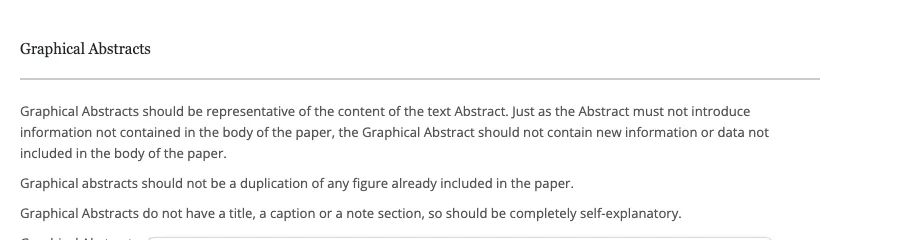
Dove Press bans the caption. Source: dovepress.com, retrieved 25 August 2026.
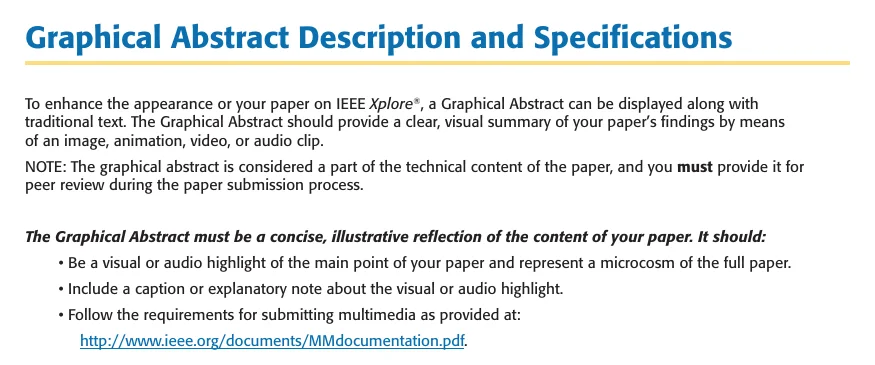
IEEE requires one. Source: eds.ieee.org, retrieved 25 August 2026.
The practical read: build the image so it works with no caption at all. That version is legal everywhere. Adding a caption later is a minute's work; stripping labels out of a flat file is not.
What "graphical abstract text" means
At an Elsevier journal it means the words inside the picture. No caption or synopsis field is attached to the image. One Elsevier journal guideline spells the rule out with the word most authors are looking for: "Any text, label, or legend must be part of the image file."
That page belongs to the Journal of Nutrition Education and Behavior, and it puts a number on the words inside the frame: "keep word count to a minimum and aim for 40-65 words." It is one journal's limit, not an Elsevier-wide one.
Two exceptions to watch for. Some journals do collect separate text — the IEEE and SMDM rows above are both cases.
Alt text is a third thing again. Dove Press now says "all figures and images will now include image descriptions (alternative text)," and that "this will be generated using AI technologies." The page points authors who "wish to write your own" to its Author Services site. That is an accessibility field, not a caption, and it is worth writing yourself.
Does it need a title?
No, and several publishers ban that too. Elsevier asks you not to use "a heading 'graphical abstract' within the image file" — the journal adds that label itself. Dove Press says the same in the row above.
ACS is the odd one out, and only in bookkeeping. Its TOC graphic guidelines tell you to "label the graphic 'For Table of Contents Only'" — a file label for the editorial office, not a title on the artwork.
Can I modify a graphical abstract from another paper and use it in mine?
No at some publishers even with permission, and permission is required everywhere else. This is the question with the least wiggle room of the six.
ACS closes the door completely:
"The graphic must be entirely original, unpublished artwork created by one of the coauthors."
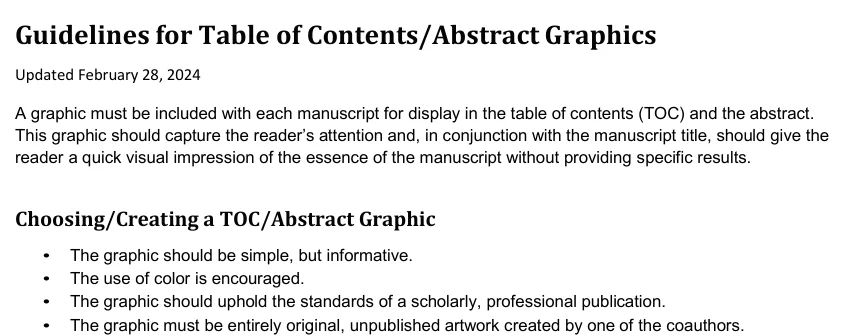
ACS rules out adapted artwork by rule, not by licence. Source: pubsapp.acs.org, updated 28 February 2024, retrieved 25 August 2026.
Note what that sentence rules out. Not just copying — adapting. And not just other people's work: a graphic you already published is out as well.
Dove Press is just as flat: "No copyrighted material can be used for Graphical Abstracts."
The rest ask for original work plus permissions. Elsevier says "authors must provide an original image that clearly represents the work described in the paper," and separately requires "the necessary permission to include any third party-owned material." Wiley puts "obtain proper permission to use all images" in its requirements list.
An open licence helps, but less than authors expect. CC BY 4.0 does let you "remix, transform, and build upon the material," on one condition: "you must give appropriate credit, provide a link to the license, and indicate if changes were made."
Now look back at the table above. At Elsevier, Wiley, JCI and Dove Press there is no caption to put that credit in, and the image itself has to stay clean. The licence and the format rule pull in opposite directions.
Which leaves one route that works at every publisher: redraw. Take the relationship you need from the source paper and draw it yourself, in your own visual language. Read the two rules above again and you will see that is what they ask for — artwork you made, not a subject nobody has drawn before. Review authors hit this constantly, and we covered reusing figures from the papers you reviewed in more detail.
Highlights and graphical abstract: why are there two boxes?
Because they are two separate submission items with different file types and different deadlines. The concept difference is covered in what a graphical abstract is. Here is only what the form wants.
| Graphical abstract | Highlights | |
|---|---|---|
| What you upload | An image file | A Word document |
| Dropdown label | "Graphical abstract" | "Highlights" |
| Content | One picture, labels inside it | Three to five bullet points |
| Limit | No word limit in the general Elsevier rule | 85 characters per bullet, spaces included |
| When it is due | Set by the journal — some take it only at revision or after acceptance | Not until the final files stage |
| Affects the decision? | Sometimes — see the edit-request question below | No |
Both rows come from Elsevier's own pages. Highlights "must be provided as a Word document — select 'Highlights' from the drop-down list when uploading files," and they are "not part of editorial consideration and not required until the final files stage." The graphical abstract goes in as "a separate file in the online submission system."
Two things follow. Sending one does not cover the other, even though both summarise the same paper. And an editable Word file is not optional for Highlights — a picture of your bullet points will come back to you.
The same Elsevier page notes one variation in the count: "three to five (three to four for Cell Press articles) bullet points." Everything else matches.
Can I use AI to make a graphical abstract, and is it ethical?
At Elsevier journals, a general image model is ruled out for this specific figure. Not for figures in general — for graphical abstracts:
"General-purpose generative AI image tools must not be used to create graphical abstracts."
Elsevier's policy points you at a different class of tool instead: "authors are encouraged to use dedicated scientific illustration tools when preparing graphical abstracts."
Elsevier does not say why. The likely reason is craft rather than misconduct: a graphical abstract is a dense arrangement of small labelled parts, which is exactly what image models garble. Other publishers land in different places, and we quoted six of them side by side.
There is a snag in the disclosure step that nobody flags. The graphical abstract row of Elsevier's own policy table sets one duty whichever tool you pick: "mention the tool used in the image caption."
But the same publisher forbids any text outside a graphical abstract. There is no caption to mention it in. Until Elsevier reconciles the two pages, put the disclosure in the article-level AI statement and say it plainly in your cover letter.
One disclosure of our own, so the advice is not self-serving. Our graphical abstract maker sends your text to a general image model and returns a flat PNG with no editable labels. Under the rule quoted above, that is not a file to submit as-is. Use it to test whether a layout reads, then rebuild the final art in an illustration tool.
The journal asked me to edit my graphical abstract. Does that mean it will be published?
By itself, no. Who sent the request tells you far more than what it asked for, and your submission system already shows you which.
Three stages produce that email, and only one of them means a decision has been made.
Before peer review. Editorial offices screen submissions first. In Elsevier's technical check, staff can add notes that are "merged into a Send Back to Author letter." The matching status reads: "Your new or revised submission has been sent back by the Editorial Team for changes prior to review." Nobody has read your science yet. This is where a required file that is missing, wrongly labelled, or in the wrong format gets caught.
During review or revision. Some journals treat the image as part of the manuscript, so reviewers see it and can ask for changes. IEEE states this outright: "The graphical abstract is considered a part of the technical content of the paper, and you must provide it for peer review during the paper submission process." A request at this stage carries the same weight as any other reviewer comment.
After acceptance. This is the one that does mean something. Elsevier's status page describes the handover: accepted articles "are automatically sent to the production department," the status changes to "Completed," and "no further modifications can be made in Editorial Manager." Proofs follow: for most journals they "will be delivered within two weeks of receiving the acknowledgement letter."
So read the sender, not the tone. A message inside Editorial Manager while your status still reads Under Review or Revise is editorial. A message from a production tracking address, arriving after an acceptance letter, is a formatting fix on a paper that is already in.
That status field is the honest answer to "what stage am I at." A file request is not a signal.
One special case that fools people: a late request for Highlights is routine, not a hint. As quoted above, they are "not required until the final files stage" by design.
Do I cite a graphical abstract, or ask permission for it?
Yes, by citing the article it belongs to. No publisher gives a graphical abstract an identifier of its own: Elsevier describes it as something displayed "in online search result lists, the online contents list and the article on ScienceDirect." It is part of the article record, so the article's reference is the only one there is to give.
The distinction that matters in the submission package is between citing and reproducing. Citing costs you a line in the reference list. Reproducing the image is a permissions item, and it runs into everything in the second question above. If the paper you are writing is itself a review, what a review's graphical abstract should show covers the citation question from the author's side.
Before you hit submit
One habit settles most of what is left: keep the editable source file. Every question above can come back weeks later — a caption rule you missed, a borrowed panel an editor queried, a label a reviewer wants changed — and by then you have moved on.
The one thing this article cannot tell you is your own journal's size, format and font rules, which vary more than anything above. We keep those in a journal-by-journal requirements table. Check yours before you export.