

 Figwise Team
Every list of free AI drawing tools ranks them on how good the picture looks. That is the wrong test. A figure you cannot submit is worth nothing, however good it looks.
So we opened each vendor's own pricing page on 26 August 2026 and looked for two numbers instead: how many drawings the free tier actually gives you, and whether its licence lets you publish them. We did not judge picture quality. We read the plans and screenshotted them, and every number below comes from the vendor's own page.
Here is the short answer:
- "Free" here means a trial balance, not a free plan. Most tools hand you one or two drawings, then ask for money.
- Not one third-party tool we checked grants journal publication rights on its free tier. Most refuse in writing on the pricing page. The rest simply never say yes.
- The route that is free with no limit is not AI at all. Bioicons or NIH BioArt for the icons, Inkscape to assemble them: no quota, no watermark, no licence question.
The free tiers, converted into drawings
Almost every tool here runs on credits. You get a small pile at signup, each drawing spends some of it, and the pile refills slowly or not at all. So comparing tools honestly takes one bit of division: credits granted, divided by credits per drawing.
Vendors rarely do that sum for you. When they do, the result is small. SciFig prints it right on the card: 50 credits at signup, "≈1 figure".
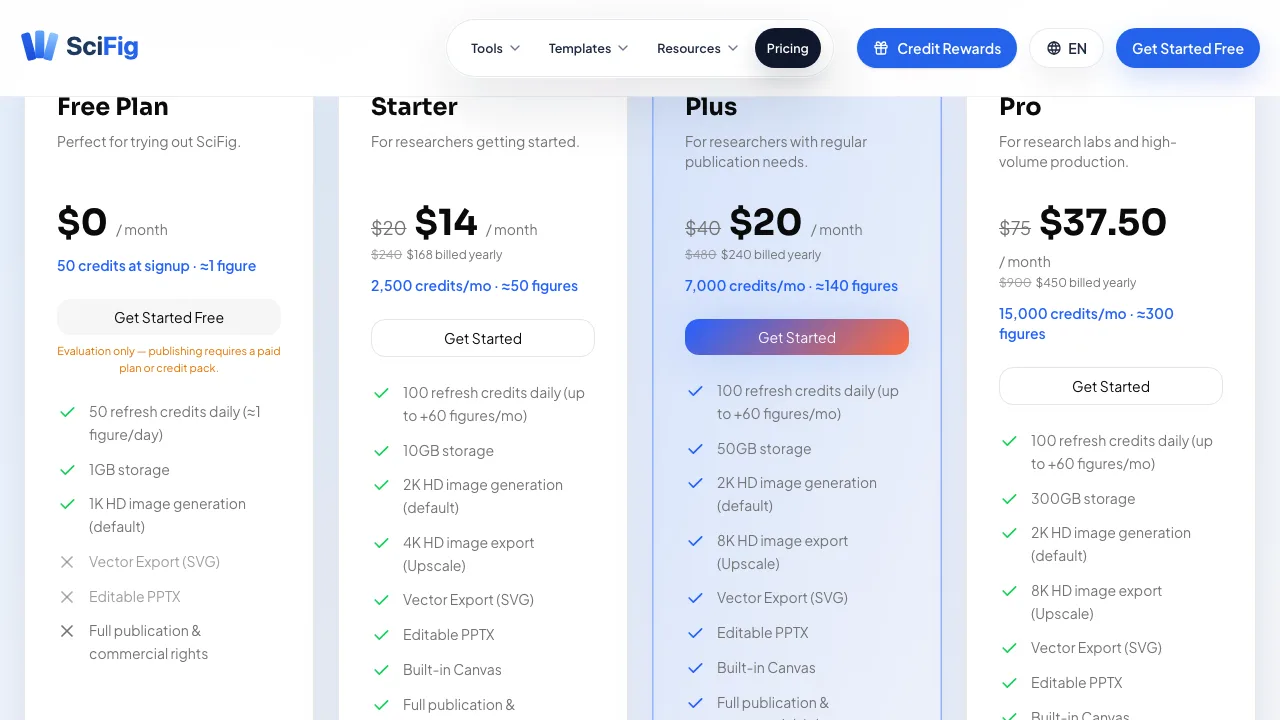
SciFig's free plan states the credit-to-figure conversion itself, and marks publication rights as not included. Source: scifig.ai, captured 26 August 2026.
SciFig — about one figure, then one a day
SciFig gives 50 credits at signup and calls that "≈1 figure". It then refreshes 50 credits daily, which it labels "≈1 figure/day".
The free plan exports 1K images. Three lines carry a cross: vector export (SVG), editable PPTX, and full publication and commercial rights. Under the price sits the clearest sentence any vendor in this roundup writes:
"Evaluation only — publishing requires a paid plan or credit pack."
FigWise — two figures, and the one licence exception
FigWise (this site) gives a new account 85 credits. A figure costs 30 credits at 1K or 2K, and 60 at 4K. That is two figures, and output is PNG.
On quota that is the same deal as everywhere else here: a signup balance worth a couple of drawings. On licence it is the exception in this roundup. Its terms draw no line between free and paid credits:
"Subject to these terms, you may use the figures you generate for academic and commercial purposes, including journal submission."
That matters less than it sounds, and the same terms say why: "Many journals require disclosure of AI assistance. You are responsible for complying with your target journal's policies." No licence overrides a publisher that refuses AI-generated images, and several do.
AcaDraw — two drawings a month
AcaDraw grants 10 free AI credits at registration, and they reset monthly. A science drawing costs 5 credits per use. That is two drawings a month, every month, for as long as you like.
Free exports are PNG only, at standard quality. The plan is labelled "For personal educational use". Watermark-free exports and a "Publish in journals/commercial use license" are listed as features of the paid tiers, not the free one.
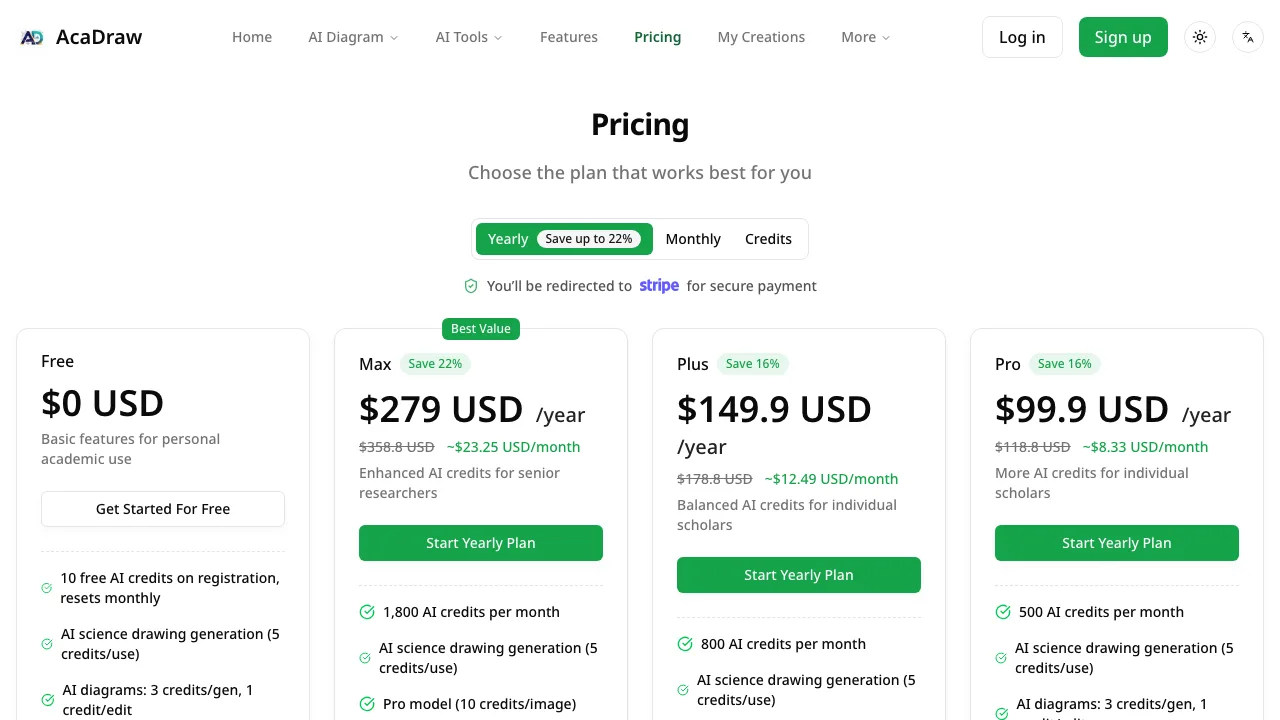
Ten credits a month at five credits a drawing is two drawings. Source: acadraw.com, captured 26 August 2026.
ConceptViz — watermarked, and drawn by a weaker model
ConceptViz does not publish how many credits registration grants, so we cannot convert it to a drawing count. What it does publish is more useful.
It is the only tool here that admits the free tier changes the model, not just the quota. Its pricing page names two routes, and free generations use the lighter one, "CV-2 Light":
"Free generations use a lighter route for trying prompts and early drafts. Fine labels and small details may be less consistent."
Labels are the part of a scientific figure that has to be right. A route that is less consistent with fine labels is a drafting route, and the page says so.
The same page settles the licence in one line:
"Images made with free registration credits include a brand watermark. Buy any credit pack or membership for watermark-free output and commercial use."
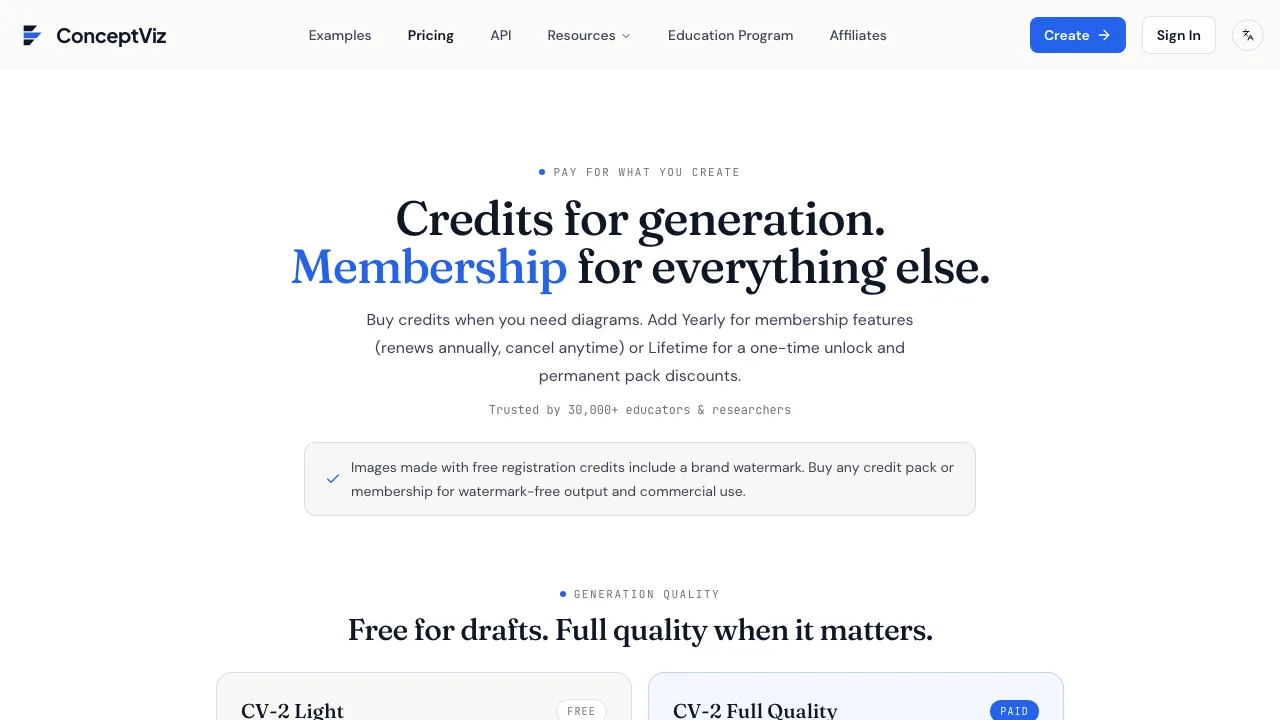
Watermark and model quality, both stated on the pricing page. Source: conceptviz.app, captured 26 August 2026.
SciDraw AI — about one drawing a day, no publication rights
SciDraw AI gives 10 credits at registration and 5 more every day. Its paid tiers price 300 credits at about 60 images, so a drawing costs roughly 5 credits. Five credits a day is about one drawing a day.
Two rows in the free column carry a ⊗ rather than a tick: SVG vector conversion, and "Journal publication / Commercial use".
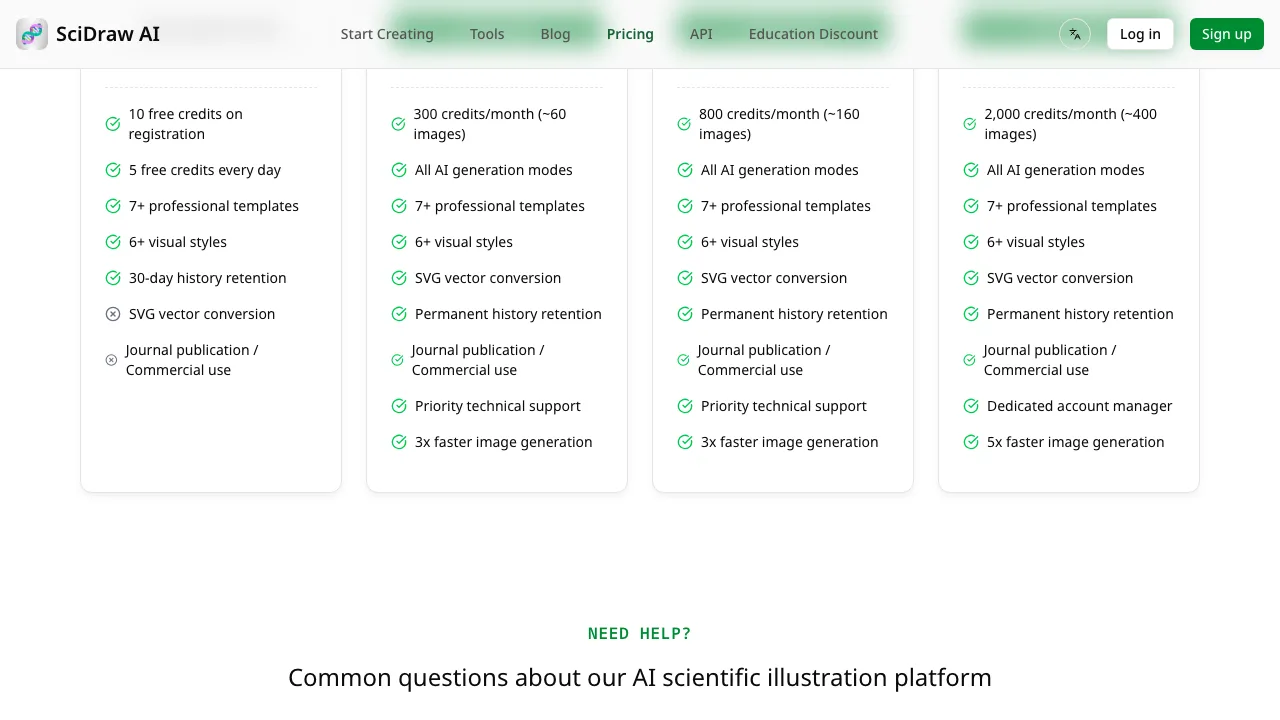
The last two rows of the free column are crossed out, not ticked. Source: sci-draw.com, captured 26 August 2026.
Its FAQ, on the same page, says the same thing in words:
"You own the images you generate. Journal publication and commercial use require a paid plan — on the free plan, images are for personal and evaluation use."
FigPad — the number depends which FigPad page you read
FigPad is the one tool here where the vendor's own pages disagree. Its pricing page lists no free tier at all, and its pricing FAQ answers "Can I try FigPad for free?" with "Every new account gets free credits with no credit card required" — no number.
Its own blog states one three times: "200 free credits at signup, no card required."
Take that number at the rate FigPad's paid plans imply, and it looks generous: the $9 Starter plan buys 130 credits for "up to 65 figure generations", so roughly 2 credits a generation. The same blog post frames 200 credits more modestly, as "enough to draft, vectorize, and export your next figure". Those are different claims, and the page that would settle it is silent. SVG export begins on the $15 Plus plan.
PaperBanana — check which PaperBanana you are on
At paperbanana.me, the pricing page lists three paid plans and no free option. Watermark-free downloads and a commercial licence are named as things paid plans include. The page mentions "priority generation with no free-user wait", which implies free use exists somewhere, but the plan itself is not described.
Before you follow anyone's link, check the name closely. Several live sites use near-identical names with different plans and prices, among them paper-banana.org, paper-bananas.com and paper-banana.ai. One of those does offer a free plan with 20 credits. Whatever you read about "PaperBanana" applies to one domain, so check the address bar against the pricing you were promised.
BioRender — three figures, and publication barred in writing
BioRender's Academic Free plan allows up to 3 figures and states "No commercial use or publication". The FAQ on the same page is blunt: "we do not allow figures made on the free plan to be used for publications or commercial use."
We cover that plan, its licence terms and its citation rule in our BioRender alternatives comparison, checked 23 August 2026.
Four limits decide whether free output is usable
Quota is the limit people notice. These four decide whether the file is any use.
- The licence. "Evaluation only" and "personal use" mean the file cannot go in your paper. This is the limit that ends the argument, and it is the one roundups skip.
- The watermark. A brand mark across the image is a hard stop for submission. On several tools it is the default free output.
- Raster only. Free tiers hand you PNG. Vector export sits behind payment on SciFig, SciDraw AI and FigPad. Without vector output you cannot fix a typo in a label months later without regenerating the whole figure.
- The journal's own rules. Springer Nature and Science both refuse AI-generated images except by editor permission, decided case by case, and Elsevier bars general-purpose AI image tools from graphical abstracts specifically. We quoted what six publishers actually allow rule by rule. No licence buys you past that one.
The comparison table
All figures checked 26 August 2026 on each vendor's own pricing page, except BioRender (23 August 2026).
| Tool | Free allowance | Drawings that buys | Free export | Publication on free tier |
|---|---|---|---|---|
| SciFig | 50 credits + 50 daily | ≈1, then ≈1/day | 1K raster | No — "evaluation only" |
| FigWise | 85 credits | 2 | PNG | Yes, per its terms — journal rules still apply |
| AcaDraw | 10 credits monthly | 2 per month | PNG | No — personal/educational use |
| ConceptViz | Signup credits, count not published | Not stated | Watermarked | No |
| SciDraw AI | 10 credits + 5 daily | ≈1/day | No SVG | No |
| FigPad | 200 on its blog, none in its pricing table | Not settled | No SVG below $15 tier | Not stated |
| PaperBanana | None listed on paperbanana.me | — | — | — |
| BioRender | 3 figures total | 3 | — | No |
One warning about tables like this one. Strip a vendor's pricing table to plain text and the tick-versus-cross icons vanish, so excluded features read as included ones. That is how SciDraw AI's free column gets reported as including SVG and publication rights, which it does not. Check the rendered page before trusting any summary, this one included.
How to choose
- Sketching an idea, or making a slide for lab meeting? Any free tier works. Take the watermark and the PNG.
- Figure is going into a paper? Almost no free AI tier covers you. Either pay for the licence, or build it from an icon library.
- Need to edit labels later? You need vector output, which means a paid tier or Inkscape.
- Submitting to Nature, Science, or an Elsevier graphical abstract? Check the publisher's AI rules before you pick any tool. The licence is not the only gate.
The genuinely free route is not AI
If free is a hard requirement and the figure has to be publishable, stop looking at AI tools. Three resources cost nothing and carry licences that permit publication:
- Bioicons — a few thousand biology icons under CC0, CC BY-SA or MIT.
- NIH BioArt — over 2,000 science and medical visuals from a US government source, free to download.
- Inkscape — an open-source vector editor. Real SVG output, no account, no quota.
You assemble the figure instead of describing it, which takes an afternoon rather than a minute. What you get back is a vector file, no watermark, no licence question, and no AI-disclosure problem. Our BioRender alternatives post walks through this route in more detail.
What it costs to skip the free tier
If you would rather pay once than assemble by hand, the cheapest verified route on 26 August 2026 is not a subscription. ConceptViz sells a one-off Starter pack: $5 for 10 credits, roughly 10 images, which unlocks watermark-free output and commercial use. It is limited to one purchase per account.
After that, the cheapest subscriptions checked, all billed yearly, were AcaDraw at about $8.33 a month, FigPad at $9, PaperBanana at $9.50, SciDraw AI at $10, and SciFig at $14. Compare what a month buys before you sort on price alone: those plans range from 130 credits a month to 2,500.
FAQ
Is there a completely free AI for scientific drawing?
Not among the third-party tools we checked. Free and publishable exists, but it is icon libraries and vector editors rather than AI.
Do I have to disclose that a figure was made with AI?
Usually yes, and the requirement survives any licence you buy. Springer Nature asks for AI use to be declared in the Introduction, Preface or Acknowledgements. Check where your target journal wants the disclosure before submission, not after.
How do I tell what a free tier really includes?
Read the paid column first. Whatever a vendor advertises as unlocked by paying — watermark-free export, SVG, commercial rights — is what the free tier withholds. That reads faster than the free column, and it is harder to word ambiguously.
Can ChatGPT or Gemini make a scientific figure?
They will produce an image, but they are general-purpose image models, which several publishers name directly in their restrictions. They also tend to invent text inside the picture. We covered what these prompts can and cannot be used for separately.
Are free student or academic plans different?
Sometimes. BioRender and SciDraw AI both offer education discounts, and some universities hold site licences that lift the publication limit. Ask your library before you pay out of pocket — an institutional licence is the one route where free and publishable reliably overlap.