


 Figwise Team
Most people who look for a BioRender alternative are not unhappy with the drawing. They hit one of two walls. One is the price. The other is the line on the free plan that says "No commercial use or publication."
Prices are the easy half, and the half that goes stale fastest. While this page was being written, one vendor's advertised rate changed within hours, and BioRender appears to be testing variants of its pricing page.
So this page quotes no monthly figures. It compares the three things that decide whether you can submit your figure at all:
- who is allowed to publish, and on which tier
- what the licence obliges you to do
- what file format you get out
For prices, open each vendor's own page — every tool below is linked. And a disclosure up front: FigWise, the site you are reading, makes figure tools too. Its own entry is below, including the part where it does not fit.
BioRender: what the plans actually gate
There are two price lists: academic for universities and non-profits, industry for everyone else at three to five times the rate. What matters more is which tier unlocks publication.
| Tier | Publication |
|---|---|
| Academic Free | Barred. Capped at 3 figures. |
| Academic paid (Individual, Lab, Institution) | Permitted; the plan lists journal publishing rights |
| Industry | Commercial terms; contact them |
Read from biorender.com/pricing on 23 August 2026. Tier structure changes less often than the prices do — check both.
Graphing and AI generation are add-ons, priced per seat on top of a plan. The academic and industry rates differ.
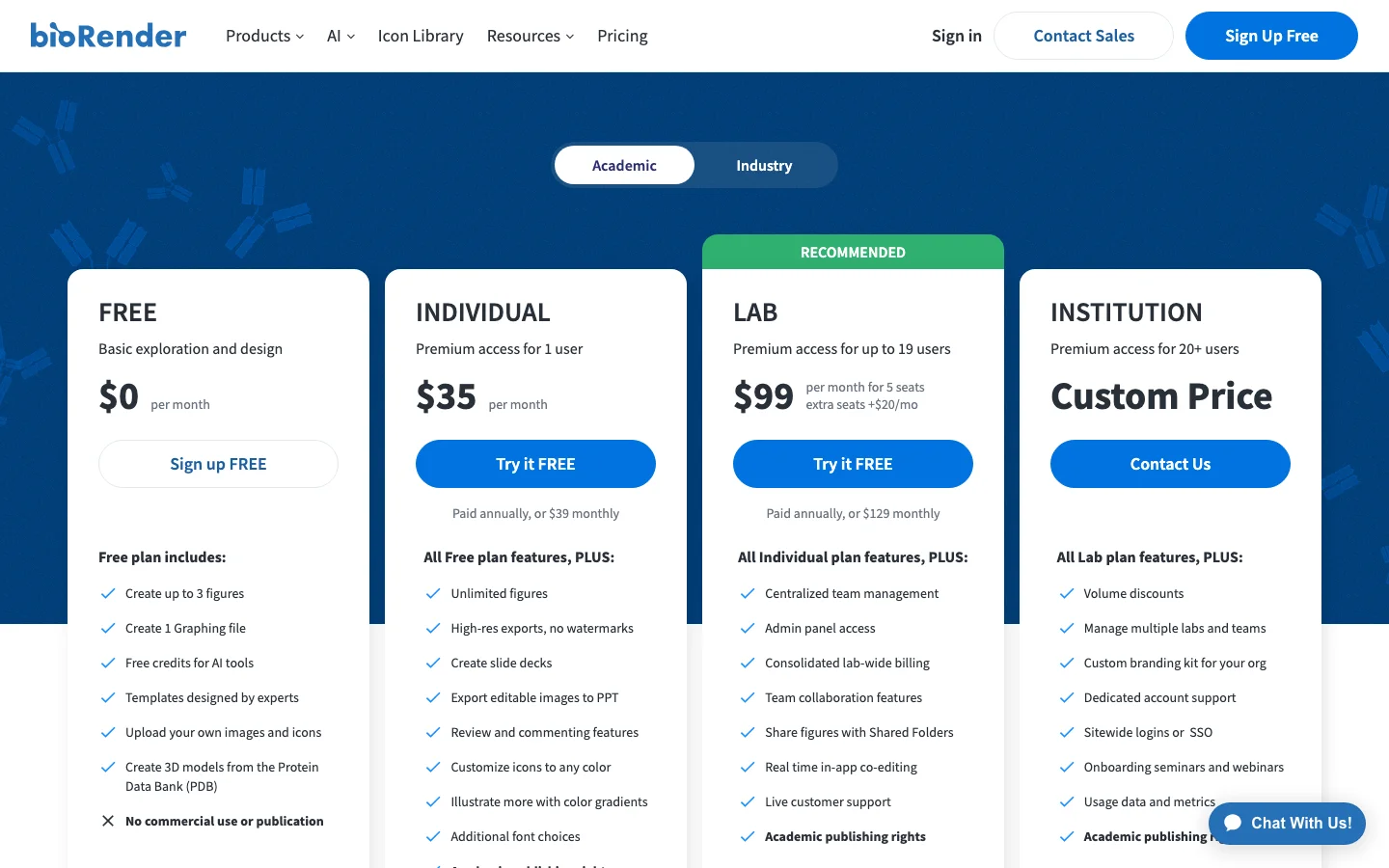
BioRender's academic tiers as displayed on 23 August 2026. Prices on this page have since changed; the tier structure is the durable part.
The free plan cannot go in your paper
This is the detail that sends most people looking. BioRender's own pricing FAQ answers it without hedging:
"No, we do not allow figures made on the free plan to be used for publications or commercial use."
The free tier's feature list says the same thing: no commercial use or publication.
Student pricing exists but is not posted publicly, and it carries a condition that matters here. Per BioRender's FAQ, student rates are only for students paying out of pocket. If a PI or a lab reimburses your fees, you are expected to buy an individual or lab plan.
Paying is not the end of it: the citation and the Publication License
Even on a paid academic plan, publishing takes two steps. The academic licence terms read:
"Completed Graphics included in any published or printed material, including websites and social media, containing BioRender Content as permitted hereunder must include a citation to BioRender adjacent to or following the Completed Graphics as a caption or in audio/visual production credits or footnotes - the citation to use will be specified in the Publication License you must generate in the BioRender Services prior to publishing the Completed Graphic."
Read the second half carefully. You do not just add a line to your caption. You generate a Publication License inside BioRender before you publish, and that licence tells you the exact citation to use. Plan for it before you submit, not during proofs.
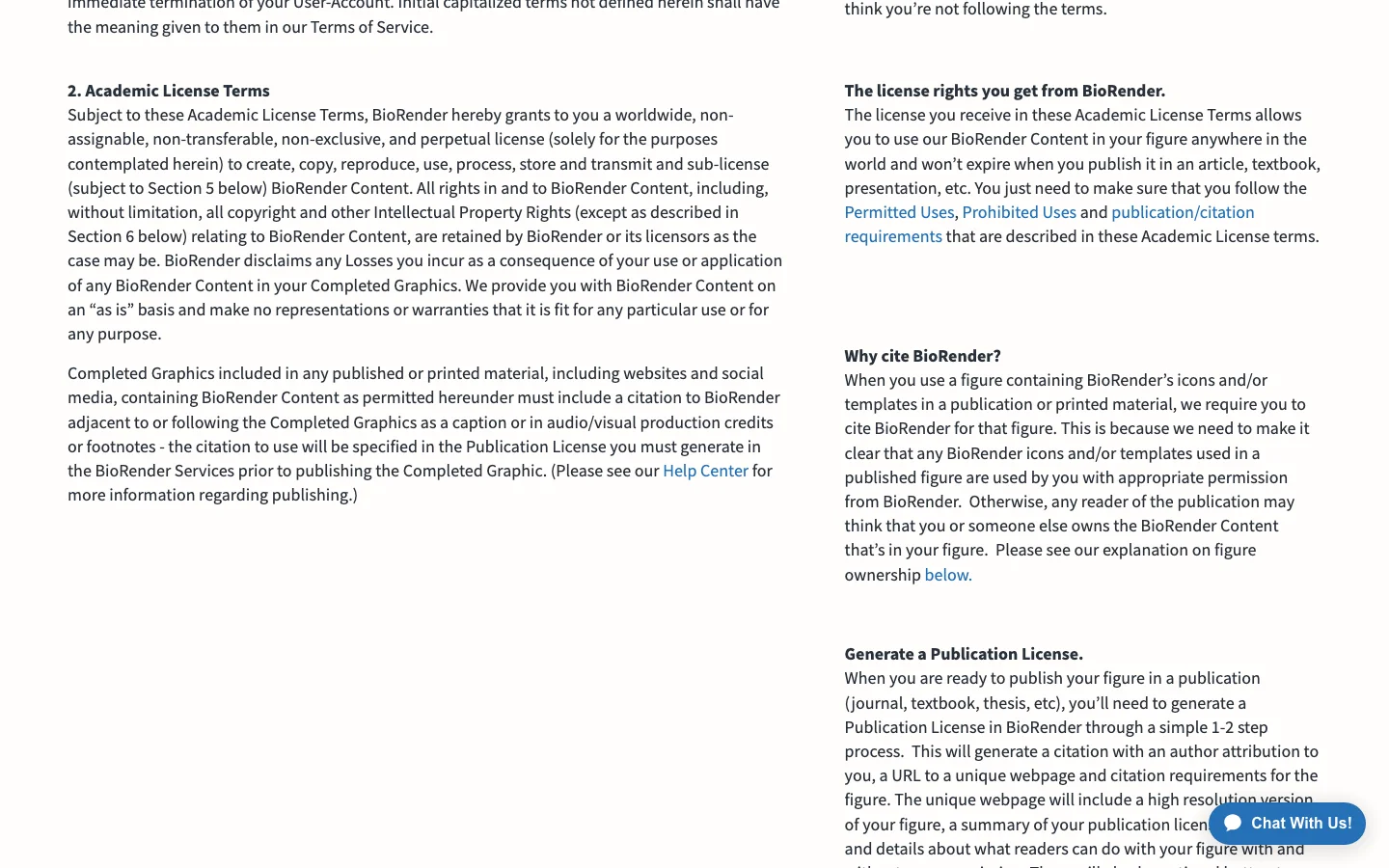
BioRender's academic licence terms, section 2. Source: biorender.com/academic-license, captured 23 August 2026.
Three free alternatives
None of these is a BioRender clone. They supply the raw material, and you assemble the figure yourself in a vector editor.
Bioicons — a free icon library
bioicons.com hosts 2,829 icons at the time of writing. The site advertises CC0, CC BY-SA and MIT sets, but single entries can carry other licences — some framework logos are BSD — so check the licence shown with each icon. You download SVGs and build the figure elsewhere.
Best for: authors who already work in a vector editor and need lawfully reusable icons.
NIH BioArt — official, free, over 2,000 visuals
NIH BioArt is run by NIAID and offers more than 2,000 science visuals, free for any use including commercial. Attribution depends on the entry. Its FAQ says citation is appreciated but not required for public-domain items, and asks you to cite the entry DOI where the licence does require credit.
Best for: biomedical figures, where an official source is easier to defend than a commercial one.
SciDraw — free, CC-licensed, neuroscience-heavy
SciDraw publishes free SVG drawings under CC BY or CC0, and its neuroscience and animal-model sets are strong. The licence sets what credit you owe. The site also asks you to consider citing the DOI printed under each drawing.
Best for: behavioural neuroscience and animal work, where its coverage beats general libraries.
What all three cost you instead
Assembly. You still need a vector editor — Inkscape is the free option and the usual pairing with these libraries. A figure BioRender would draw in twenty minutes can take an afternoon this way.
Two paid alternatives
Mind the Graph — the closest like-for-like
Mind the Graph advertises more than 75,000 illustrations. Its structure, which is the durable part:
| Tier | What the pricing table shows |
|---|---|
| Starter (free) | Up to 4 illustrations, restricted library access; Full Publishing Rights not included |
| Researcher | "Watermark-free illustrations"; unlimited vector downloads with full publishing rights |
| Prime | Adds "No watermarks and Full rights to creations" |
| Teams and Institutions | Per-user tier with a full publication licence |
Read from mindthegraph.com/pricing on 23 August 2026. Prices on that page are promotional and changed during the writing of this article; read them there, not here.
The free tier is the point to be careful about. The pricing table marks Full Publishing Rights with a dash for Starter, and sells watermark-free output as a paid feature. If you intend to publish from a free account, get that in writing from support first.
Illustrator or PowerPoint — the tools you already have
Adobe Illustrator and PowerPoint are still the default in many labs. Neither ships a science icon library, so pair them with Bioicons or NIH BioArt. Check prices with Adobe and Microsoft.
Best for: anyone whose institution already pays for the licence.
FigWise — this site, and where it does not fit
Our generators split into two kinds, and only one of them belongs anywhere near a submitted figure.
The flow diagrams are template renderers, not AI
They draw what you type. The PRISMA flow diagram generator and the CONSORT flow diagram generator take your counts and draw the standard layout in the browser. They are free, need no login, and export SVG and PNG.
Nothing there is model-generated, so none of it runs into journal AI rules. Our volcano plot and phylogenetic tree generators work the same way.
The figure generators are AI, and that limits their use
They send your text to an image model. The graphical abstract maker sends your abstract to a general image model and returns a raster image at 1K resolution — not a vector file, and below the 1,328 px width Elsevier asks for in a graphical abstract. Elsevier's policy is blunt about that class of tool:
"General-purpose generative AI image tools must not be used to create graphical abstracts."
So use ours to test a layout, then rebuild the file you submit in an illustration tool. The same policy points to dedicated scientific illustration tools instead, and names BioRender and Mind the Graph among its examples. It adds one duty whichever tool you pick: mention the tool used in the image caption.
That page also corroborates the premise of this whole article, in one sentence worth quoting to anyone weighing a free plan:
"In some cases, free versions of illustration tools are intended for educational or internal use only and may not permit publication in academic journals."
Our AI figures run on credits, not a seat, and the free signup credits cover a few tries. Prices are on the pricing page. Credits bought in a pack last a year; subscription credits expire with the billing period.
The comparison table
| Tool | Free tier publishable? | Licence obligation | Export |
|---|---|---|---|
| BioRender | No — publication excluded | Citation string from a Publication License you generate before publishing | High-res raster; slide decks |
| Mind the Graph | Full Publishing Rights not listed for the free tier | Per plan terms | Vector on paid tiers |
| Bioicons | Yes, per each icon's licence | Attribution unless the icon is CC0 | SVG |
| NIH BioArt | Yes | Attribution per the entry's licence | Vectors, icons, brushes |
| SciDraw | Yes | CC BY or CC0; DOI credit requested | SVG |
| Illustrator / PowerPoint | Yes | None | Vector / raster |
| FigWise flow diagrams | Yes | None | SVG, PNG |
| FigWise AI figures | Not for an Elsevier graphical abstract | Disclose the tool in the caption | Raster, 1K |
Asset counts and feature lists are what each vendor claims, not what we counted, and both change. Trust the licence and rights columns for longer.
How to choose
- One figure, once. Bioicons or NIH BioArt plus Inkscape. Cost: an afternoon.
- You publish figures regularly. Mind the Graph is the closest like-for-like to BioRender; compare the two on current prices yourself, and check whether your institution already holds a site licence for either — many do, which changes the answer completely.
- A PRISMA or CONSORT flow diagram. Neither BioRender nor Mind the Graph is built for these. Use a template renderer and keep the numbers under your own control.
- A first draft of a graphical abstract. An AI tool will do that, ours included, but rebuild the submitted file in an illustration tool.
FAQ
Can I publish a figure made with BioRender's free plan?
No. Its pricing FAQ says figures made on the free plan may not be used for publications or commercial use. Publishing rights come with the paid academic tiers.
Is BioRender free for students?
Only within the free plan's limits: three figures, no publication. A separate student rate exists but is not posted, and per BioRender's FAQ it is limited to students paying out of pocket — not to those reimbursed by a lab or PI.
Do I have to cite BioRender?
Yes, and it is more than a caption line. You generate a Publication License in BioRender before publishing, and that licence specifies the citation to use.
Which alternative exports true vector files?
Bioicons and SciDraw give you SVG directly. Mind the Graph advertises vector downloads on its paid tiers. Our flow-diagram generators export SVG. BioRender's academic plans advertise high-resolution raster export and slide decks rather than SVG.
Is a free icon library enough on its own?
Only if you are comfortable in a vector editor. The libraries supply parts, not layouts — arranging, aligning and labelling them is the part that takes the time.