

 Figwise Team
Almost every "best AI graphical abstract generator" list ranks tools on how good the picture looks. One line in Elsevier's policy knocks most of these tools out before you ever look at the output:
"General-purpose generative AI image tools must not be used to create graphical abstracts."
So the useful question is not which AI draws best. It is which tools produce a file you can actually attach to a submission.
Here is the short answer, after checking those tools against the rule and against their own pricing pages:
- No general-purpose image model qualifies. That covers ChatGPT and Gemini, and it covers the research-branded sites that call those models behind the scenes.
- The tools Elsevier does name are the dedicated illustration platforms — and their free plans are the ones that bar publication.
- The genuinely free and genuinely publishable route is not an AI at all: a free icon library plus a vector editor.
The rule that decides it
Elsevier's generative AI policies for journals give graphical abstracts their own rule. The page was updated in June 2026. Its reason is craft, not ethics:
"Graphical abstracts are often complex visual summaries that combine multiple graphical elements, icons, and design components."
The same page says what to use instead, and names two tools:
"Authors should use dedicated scientific illustration tools (such as BioRender or Mind the Graph) or other professional illustration tools when preparing graphical abstracts."
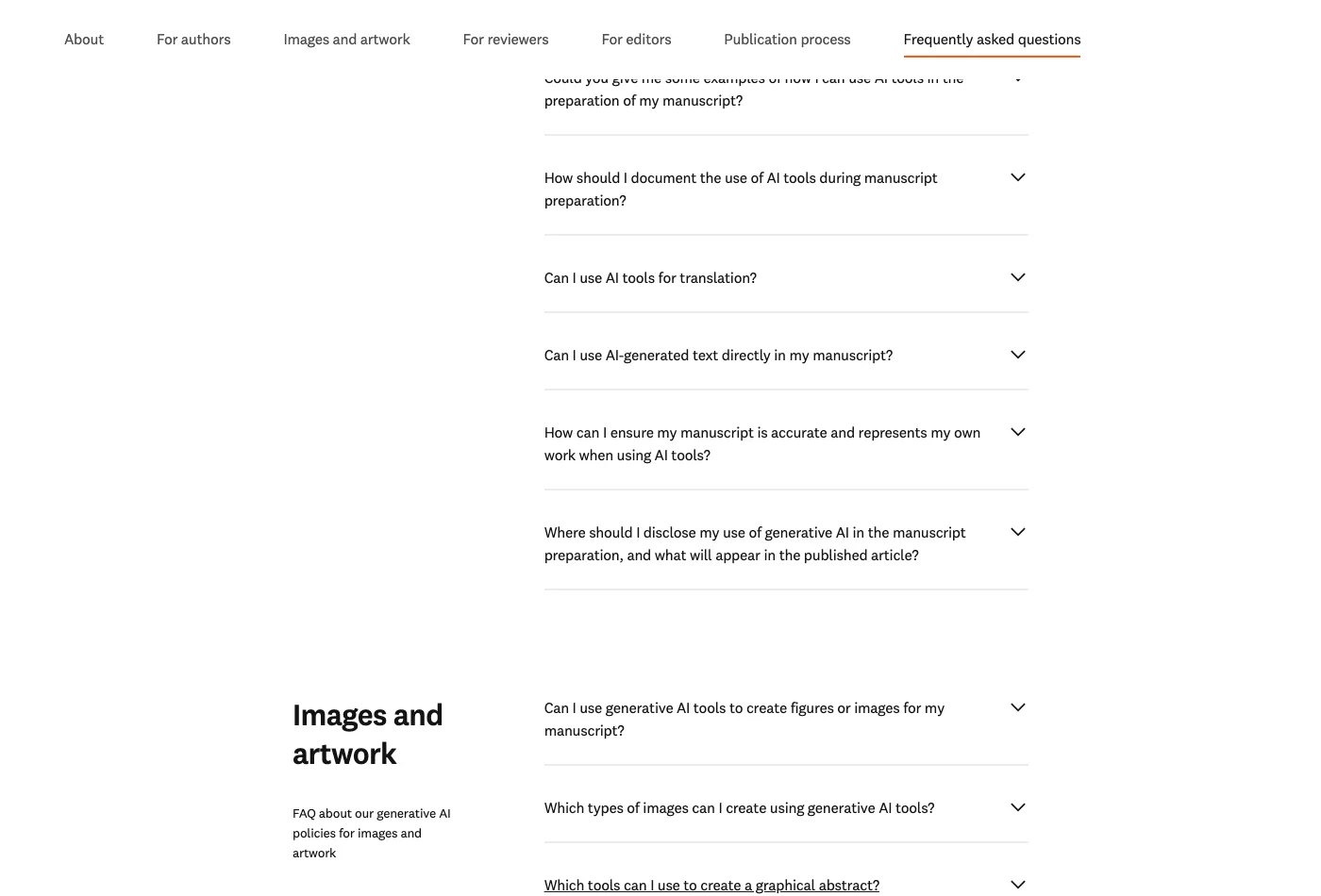
Elsevier's FAQ, "Which tools can I use to create a graphical abstract?" Source: elsevier.com, captured 25 August 2026.
Two more sentences on that page matter more than any tool review. The first warns about exactly the plans you are searching for:
"In some cases, free versions of illustration tools are intended for educational or internal use only and may not permit publication in academic journals."
The second says where to look next:
"Authors may wish to check whether their institution provides access to a licensed or institutional version of such tools."
Elsevier is the loosest of the six publishers whose AI figure rules we compared side by side. Springer Nature is stricter and shorter: "Avoid generative AI images or figures. These are not permitted for publication unless they meet specific exceptions … and are clearly labelled as 'AI-generated.'" Those exceptions are narrow: legally sourced, directly about AI, or based on verifiable scientific data. The AI use goes in the Introduction, Preface or Acknowledgements.
How to tell which side a tool is on
Marketing will not tell you. Two questions will.
- Does a model paint the picture, or do you assemble it from a library? A model that renders a whole scene from a sentence is the class Elsevier rules out, whatever the site is called.
- Can you edit a label after the fact? If the words are baked into the picture, a copy editor's request months later means a rebuild.
Elsevier's footnote even lists the barred class by name: "Examples include ChatGPT, Microsoft Copilot, Gemini, Claude, and DALL·E."
The tools, one at a time
ChatGPT, Gemini, Copilot, DALL·E
Out, by name. These are the examples Elsevier's policy footnote gives for generative AI, and the graphical abstract rule points straight at them.
ConceptViz
Out, and its own page shows why. The graphical abstract maker promises "a publication-quality, journal-ready illustration — sized for Elsevier, Nature, and Cell submissions."
Read the line under its own input box: "Generate the illustration here, then add your text labels in a vector or slide editor."
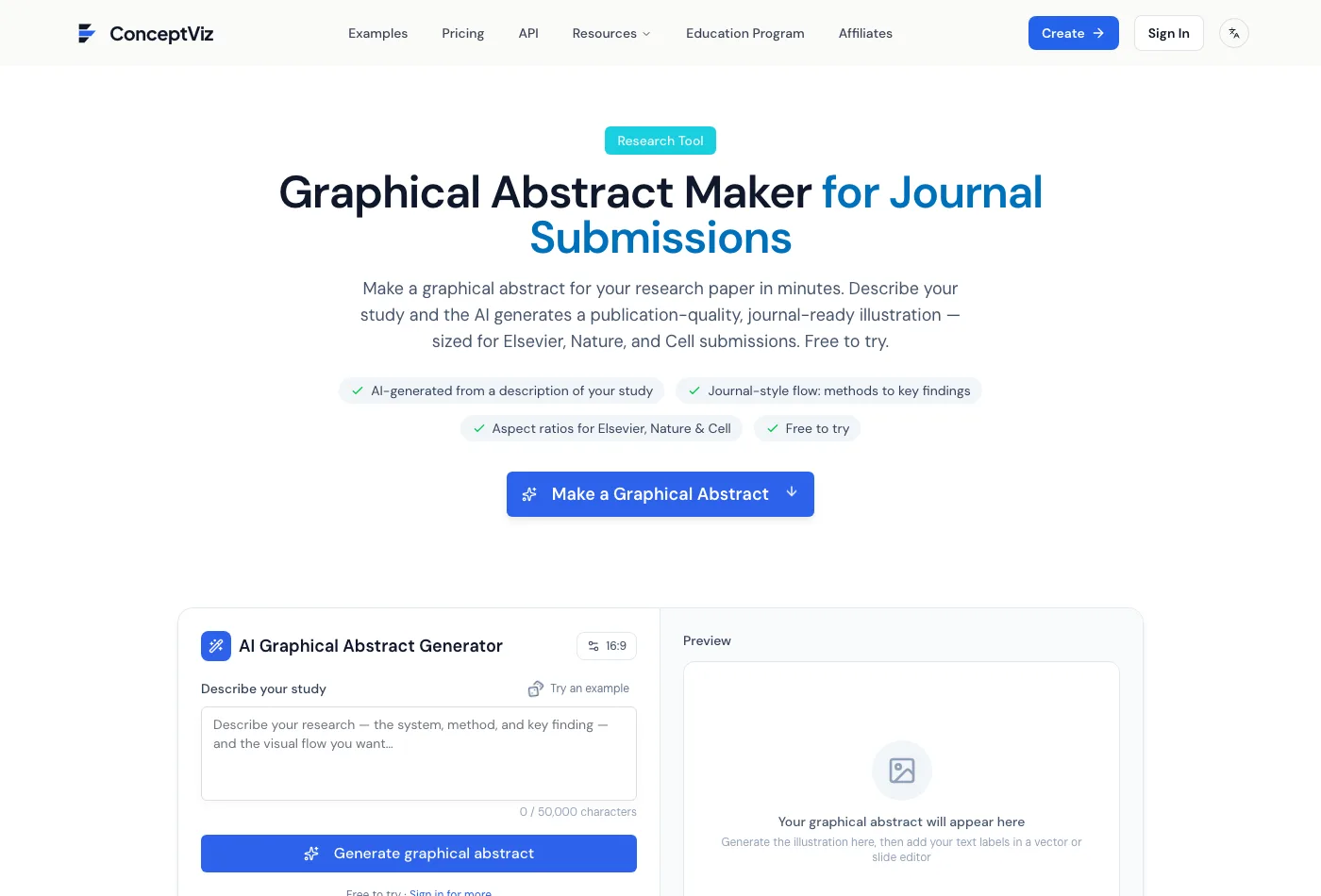
Both halves of the claim, in one screen. Source: conceptviz.app, captured 25 August 2026.
Its FAQ is honest about the cause: "AI-rendered text can be unreliable." That is a model painting a picture, which is the barred class.
Its pricing page settles the free half:
"Images made with free registration credits include a brand watermark. Buy any credit pack or membership for watermark-free output and commercial use."
PaperBanana
Out, and it says so itself. Every paid tier on paperbanana.me lists the same feature: "Supports GPT Image 2, Nano Banana, Nano Banana Pro, and Nano Banana 2."
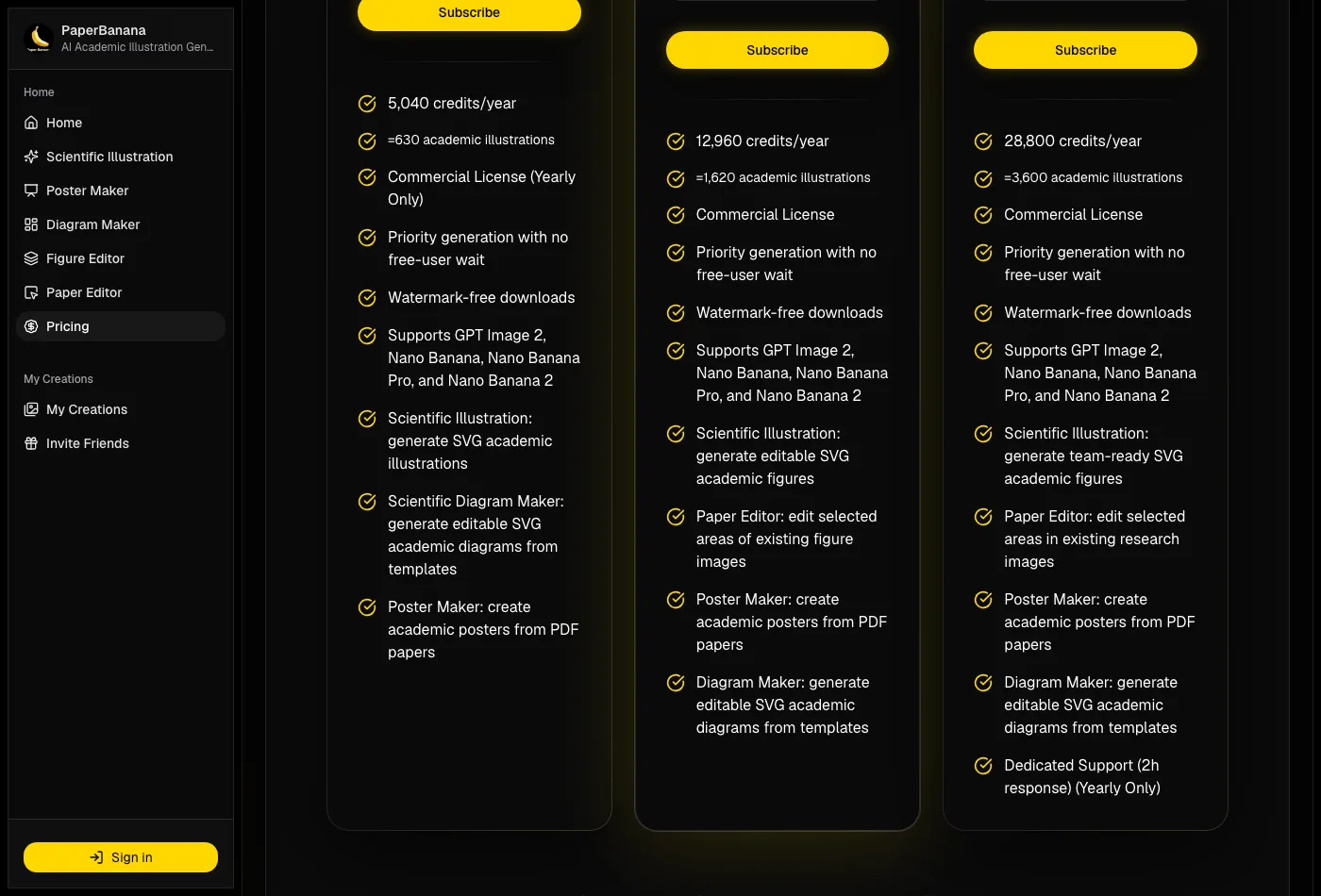
PaperBanana's plan features. Watermark-free downloads and the commercial licence sit on the paid tiers, the cheapest of which grants the licence on annual billing only. Source: paperbanana.me, captured 25 August 2026.
Those are general-purpose image models with a research-shaped front end. A wrapper does not change the tool underneath.
Its pricing page lists no free tier at all. Watermark-free downloads and the commercial licence are paid features, and on the cheapest tier that licence is annual-billing only.
GAAbstract
Different architecture, same problem with the free plan.
GAAbstract reads your abstract, builds a diagram from layout templates, then hands you an editor. Its FAQ: "Every generation stays fully editable: change the layout, labels, terminology, icons, colors, and wording …" Editable labels put it much closer to what Elsevier asks for.
The free plan is where it stops. Its own FAQ: "Free downloads carry a small watermark; any paid purchase removes it." Vector export is paid too.
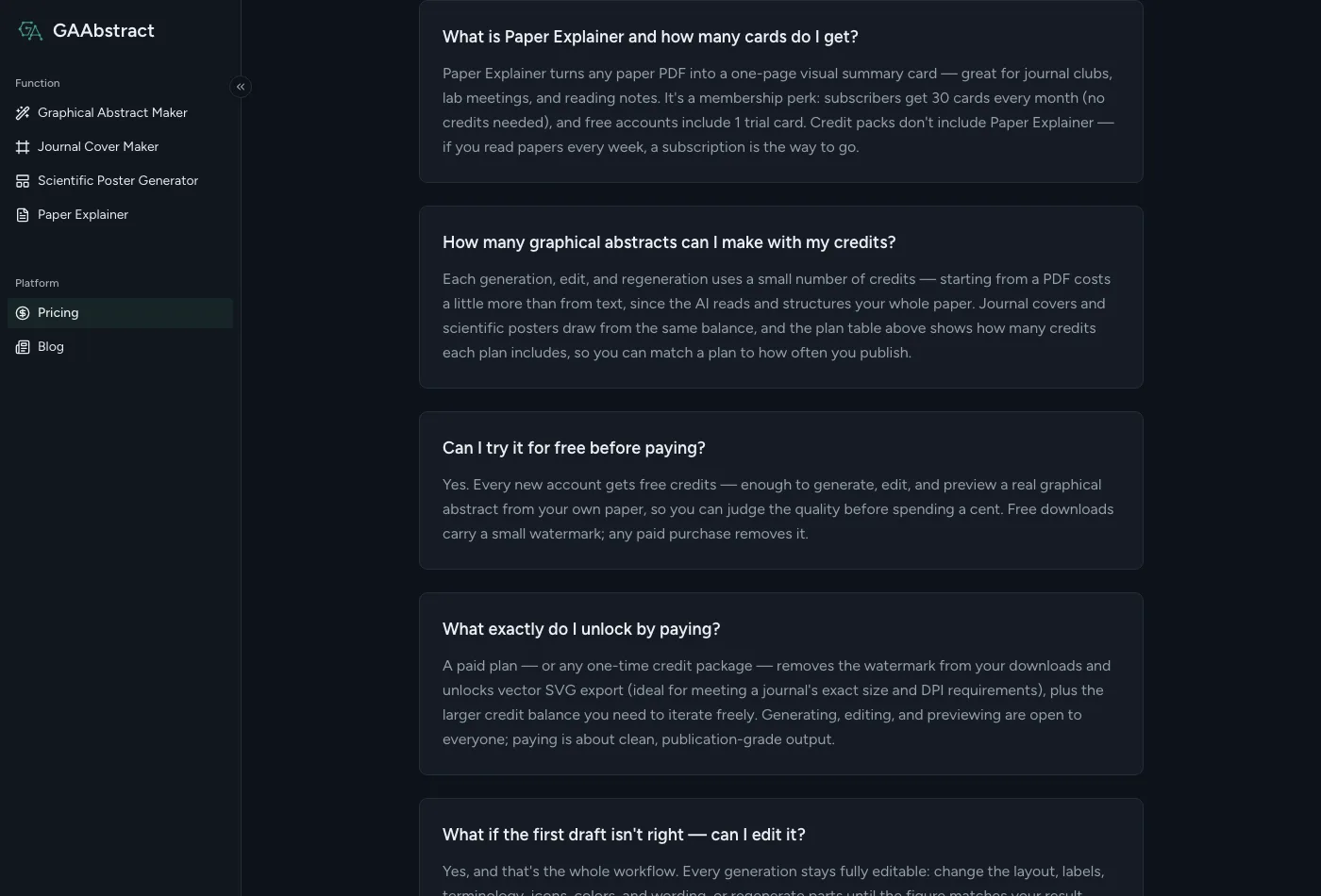
GAAbstract's pricing FAQ. Source: gaabstract.com/pricing, captured 25 August 2026.
The site still says it "produces publication-ready graphical abstracts you can take straight into your journal submission." A watermarked file will not clear production at any publisher checked here, so that claim describes the paid plans only.
Mind the Graph
Named by Elsevier, and the free plan still cannot publish.
The pricing page prints the free Starter plan's whole feature list. It runs to four items:
- Unlimited creations
- Use of up to four scientific illustrations
- Restricted access to the illustration library
- Graphical abstract, infographic and poster formats
Publishing rights are not on it. Neither is watermark-free output, nor vector download. All three show up one tier up, where the list reads "Unlimited Vector Downloads with full Publishing Rights."
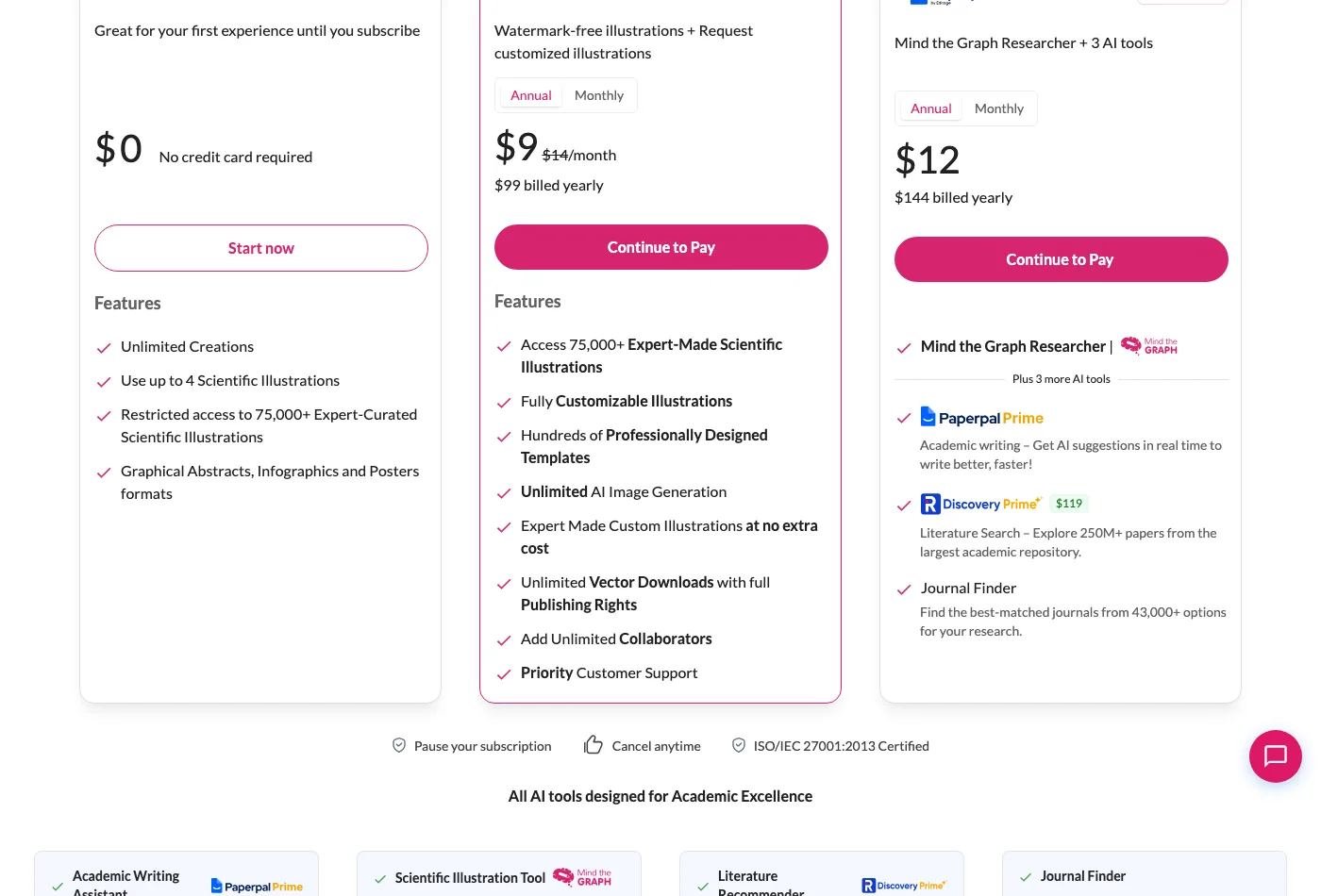
The free plan's feature list, next to the paid one. Source: mindthegraph.com/pricing, captured 25 August 2026.
One wrinkle worth knowing: the paid tier also advertises "Unlimited AI Image Generation." Elsevier names the platform as an example of a dedicated tool, and bars general-purpose models. It does not say which side an AI feature inside a named platform falls on. If you use that feature for a submitted abstract, ask the journal first.
BioRender
The other tool Elsevier names, with the same split. Its free plan is marked for no publication. Publishing rights come with the paid academic tiers, and those ask you to generate a licence before you publish. We walked through that licence, and the free options, in BioRender alternatives.
FigWise, this site
Out for a submitted file.
Our graphical abstract maker sends your abstract to a general image model and returns a flat raster image with no editable labels. Under the rule at the top of this page, that is the barred class. It needs an account and spends 30 credits per generation, and a new account starts with 85. Use it to see a layout quickly, then rebuild the file you submit somewhere else.
Free icon libraries plus a vector editor
The only route that is free and publishable — and the only one with no AI in it.
Three libraries cover most fields between them. NIH BioArt is run by NIAID and is strongest on biomedical subjects. SciDraw leans neuroscience and animal models. Bioicons is the broadest and the most mixed on licences, so read the licence shown with each icon.
All three hand you vector files. You place and label them in Inkscape, which is free and carries no licence problem. This is what "dedicated scientific illustration tool" means on no budget.
Free here means attribution, not anything goes. Read the licence shown with each icon — CC0, CC BY, CC BY-SA and MIT all turn up — and carry whatever credit line it asks for into your caption.
The cost is an afternoon rather than a minute. There is no prompt box, so you place every element yourself. In exchange the file stays editable forever and no plan gates the export.
Side by side
| Tool | What makes the image | Free plan can publish? | Labels editable after? |
|---|---|---|---|
| ChatGPT, Gemini, Copilot, DALL·E | General image model | Barred by the rule | No |
| ConceptViz | General image model | Barred by the rule; also watermarked, no commercial use | No |
| PaperBanana | General image models, named on its pricing page | Barred by the rule; also watermarked | Partly, via its editor |
| GAAbstract | Templates plus an editor | No — free downloads watermarked | Yes |
| Mind the Graph | Curated illustration library | No — rights not listed on the free plan | Yes |
| BioRender | Curated illustration library | No — publication excluded | Yes |
| FigWise AI figures | General image model | Barred by the rule | No |
| Icon library plus Inkscape | You do | Yes | Yes |
Plan contents read from each vendor's own pricing page on 25 August 2026, except BioRender, read 23 August 2026. Prices move; which tier holds the publishing rights moves less.
What "free" actually costs here
Three different things hide behind the same word, and only the third one is the deal-breaker.
- A watermark. Annoying but honest. You know immediately that you cannot submit it.
- A credit cap. Fine for one paper. You just cannot iterate much.
- Missing publication rights. The dangerous one. The file looks finished, downloads clean, and still is not yours to publish. Nothing on the image tells you.
That third case is why Elsevier put a warning about free plans in an FAQ about tool choice.
Where AI still helps
Drafting, not delivering.
A model is fast at showing you what a layout feels like:
- Does the story read left to right, or top to bottom?
- Are four panels too many?
- Should the result sit in the middle of the frame, or at the end?
Generate a few, pick a direction, then throw the image files away and hand the layout over:
- Rebuild it in a tool that grants you the rights, using its own icons rather than tracing the generated art.
- Retype every label. Model-rendered text is the first thing that breaks, and your wording has to match the manuscript exactly.
- Check the export against your journal's graphical abstract requirements, not against how it looks on screen.
- Save the editable source next to your manuscript, so a copy editor's request later costs minutes.
If you want the full build order rather than the tool choice, we wrote how to make a graphical abstract for that.
Questions authors ask
Is there a truly free AI graphical abstract generator?
Not one you can publish from. Every AI tool here either sits in the class Elsevier bars, or charges for the rights and the watermark removal. Most do both. Free and publishable does exist, but it is NIH BioArt, SciDraw or Bioicons plus Inkscape, and none of that is AI.
Can I use ChatGPT to make a graphical abstract?
Not for an Elsevier submission. ChatGPT is the first example in Elsevier's own definition of generative AI. Graphical abstracts are the one figure type the policy singles out. Springer Nature does not permit generative AI figures at all, barring narrow exceptions.
Does an AI tool built for scientists count as a "dedicated scientific illustration tool"?
Only if the illustration comes from a licensed library rather than a model. That is the line Elsevier draws — curated icons with clear licensing terms on one side, a model rendering a scene on the other. A science-themed name and journal-shaped aspect ratios do not move a tool across it.
What is the best software for a graphical abstract if AI is out?
Whatever you can license and reopen. Inkscape if you want free and vector. Illustrator if your lab already pays for it. BioRender or Mind the Graph on a paid tier if you make figures often and want the icon library.
PowerPoint is fine for the drawing and awkward at export. Check the saved file, not the slide.
Do I have to disclose which tool I used?
Yes, and it is cheap insurance. Elsevier asks you to name the tool in the image caption, whichever one you picked. Springer Nature wants it declared in the Introduction, Preface or Acknowledgements. Any permitted AI image also has to be labelled "AI-generated."
Each publisher words this differently. Read your target journal's author guide, not just the publisher's page.
Before you pick one
Open the pricing page of any tool you are considering and find the tier that says publishing rights or commercial use. If that is not the tier you are on, nothing else about the tool matters for this figure. Then ask your library whether the institution already holds a licence — Elsevier suggests it, and it is the cheapest way to end up on the right tier.